What we solved
Leftover meals and surplus groceries get binned because the person two streets over never hears about them. A generic “post and hope” feed does not help - you need distance filtering, a push when something lands nearby, and a direct line to the poster before the food is gone. FoodShare closes the gap between “I have extra” and “I’ll take it” inside a 10km radius.
The system at a glance
A Flutter mobile app (iOS + Android) backed by Firebase handles every piece: Auth, Firestore for posts and chats, Cloud Messaging for push, Storage for photos, Cloud Functions for the geofenced notification fan-out. Algolia powers search. Google Maps SDK handles location. No custom backend - managed services end to end.
What the user experiences
- Open the app. Location is captured once.
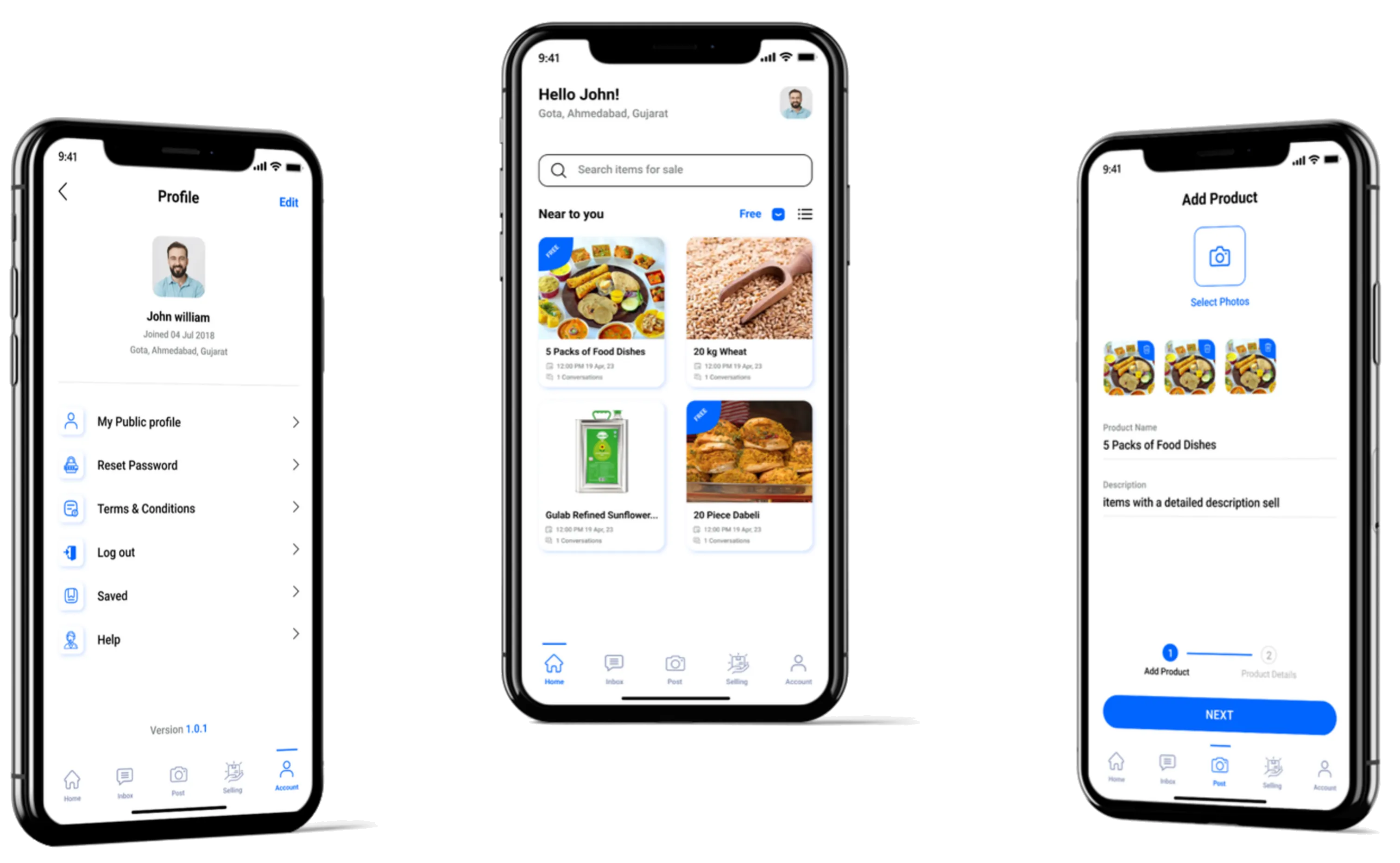
- The feed shows “Near to you” - listings within 10km, filtered by category and veg/non-veg tag.
- A new listing triggers a push to everyone in range.
- Tap in, open an in-app chat with the poster, arrange pickup.
- Confirm collection when the food changes hands. The listing closes.
- The poster gets a push when the listing closes.
- Save listings, edit your own posts, delete when the food is gone.
How we built the pieces
The 10km radius - geohash, not Haversine-per-query
A naive “give me posts within 10km of this lat/lon” query over Firestore hammers the index on every refresh. We geohash each post on write, and the query filters by hash prefix plus a small Haversine check on the candidates. Fast at scale, cheap to index.
The push fan-out - Cloud Functions, server-side
When a new post lands, a Cloud Function runs: find every user whose geohash prefix matches (≤10km), send FCM pushes. When a listing is marked picked-up, a second Cloud Function pings the poster. Fan-out stays server-side; users do not need the app open to be notified. A user who turned off notifications is filtered at the Function, not at the device.
The chat - Firestore real-time
Each listing has a conversation thread keyed by listing-id + the two user-ids. Firestore real-time listeners keep both sides in sync. No separate chat backend; no WebSocket we have to run.
Search - Firestore + Algolia
Firestore is great for the document model and bad for text search and multi-facet filters. A Cloud Function mirrors every post to Algolia on write; the app queries Algolia for search and filters, and reads the full doc from Firestore when the user taps in. The split is invisible to the user.
Pickup confirmation - so the listing actually closes
The poster marks the listing “picked up” when the food changes hands. The listing drops off the feed and a closure push goes out. This is the piece most community-share apps skip, which is why they all end up full of stale posts.
The map is the easy part
Geofenced apps are not just “add a map screen.” The hard parts are the distance math, the notification fan-out to the right subset of users, and a search layer that respects the radius. FoodShare does all three, on Flutter + Firebase + Algolia, in one codebase, with a pickup loop so the feed stays honest.
Results
- iOS + Android from one Flutter codebase.
- Real-time fan-out to users in a 10km radius per new post.
- In-app chat to coordinate pickup without leaking phone numbers.
- Pickup confirmation flow so listings don’t rot.
- Cloud Functions used for both radius-scoped announce pushes and post-close notifications.
What an engineering team should take from this
If you are building any geofenced consumer app (lost-and-found, local events, dog walking, community classifieds), three reusables:
- Geohash for radius queries - the index math is done for you; don’t roll your own.
- Fan-out in Cloud Functions, not in the mobile client - battery-friendly and resilient.
- Mirror to Algolia for search - Firestore does not do multi-facet filtering well and you will need it eventually.
Tech stack
- Mobile: Flutter 3.7.1 (iOS + Android)
- Backend (managed): Firebase Auth, Firestore, Cloud Functions, FCM, Storage
- Maps & location: Google Maps SDK for Flutter, geohash indexing
- Search: Algolia with geo-aware index
- State: Flutter idioms (provider or Riverpod pattern - inferred)
Screens